
Hướng dẫn download và cài đặt arduino ide

Hoang Van Dong 28/07/2016
huong-dan-download-va-cai-dat-arduino-ide

Hướng dẫn Download Arduino IDE

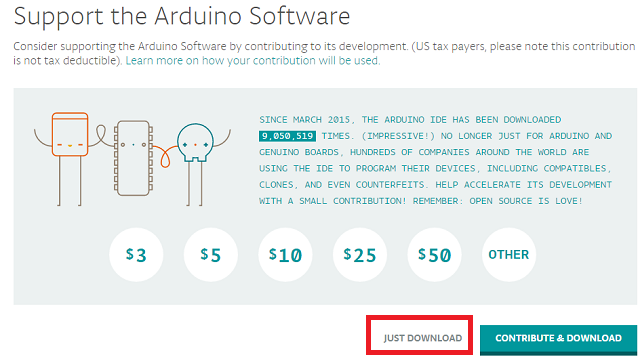
Bước 1: Download trực tiếp phần mềm Arduino IDE tại đây hoặc Truy cập vào trang  http://arduino.cc/en/Main/Software  và tải về chương trình Arduino IDE mới nhất, phù hợp với hệ điều hành của máy mình bao gồm Windown, Mac OS hay Linux. Với Windown có hai bản Cài đặt (.exe) và bản Zip (chỉ cần giải nén và chạy). Tuy nhiên các bạn nên tải bản cài đặt (.exe) để trình cài đặt tự động cài đặt cả driver cho các board mạch arduino. Các bạn lưu ý phần khoanh đỏ

Download Arduino IDE


Bước 2: Chọn JUST DOWNLOAD (free download)
 

Bước 3 : Cài đặt driver để nhận board Arduino

Mặc định khi cài đặt Arduino IDE phần mềm sẽ cài luôn các driver để máy tính có thể nhận được các board mạch Arduino. Tuy nhiên một số trường hợp máy tính không nhận được board mạch Arduino, khi đó các bạn làm như sau:

Cắm lại cáp USB nối giữa máy tính và Board Arduino, khi đó hiện ra bảng thông báo

Cài driver cho board Arduino

Bây giờ bạn click vào Start Menu chọn Control Panel kế đến chúng ta chọn System and Security, click System và sau đó chọn Device Manager

Cài đặt Driver cho Arduino

 Chúng ta sẽ thấy cảnh báo màu vàng thiếu driver trên Arduino. Click chuột phải trên Arduino Uno icon sau đó chọn “Update Driver Software”

Chọn “Browse my computer for driver software”

Cài đặt Driver cho Arduino

Chọn đường dẫn tới folder “driver” nơi mà phần mềm Arduino được lưu trữ.

Cài đặt Driver cho Arduino

Đối với Board mạch Arduino Uno R3 dán, cần cài đặt driver cho CH340, các bạn download tại đây


Xem video hướng dẫn cài đặt Arduino IDE

Bình luận (5966)
binh-luan

RalphInady

12/10/2022
see this site https://1win-online-uz.com/
binh-luan

Prestonsausa

12/10/2022
https://newsfromclinquiplankeyp1.blogspot.com/2022/10/holiday-branch-hours-td-canada.html , vmware workstation 12 pro 64 bit key free , retscreen expert manual pdf free ,windows 10 pro google drive 2019 free microsoft word 2013 lecture notes free , windows 10 no inicia despues de actualizacion free , windows 10 home local administrator account free https://newsfrom70terccontal
binh-luan

MichaelpEalm

12/10/2022
canadian pharmacy cafergot
binh-luan

Raymond2406Ionix

12/10/2022
This is my first time come here https://godotengine.org/qa/index.php?qa=user&qa_1=cavenote03 https://morphomics.science/wiki/Victoria_Wig_By_Jon_Renau http://nihaotxt.com/space-uid-63374.html https://mathoverflow.net/users/380442 https://www.file-upload.com/tum899n14v3o I am glad to come this forum I am glad to come this forum
binh-luan

Emily

12/10/2022
Howdy would you mind stating which blog platform you're using? I'm looking to start my own blog soon but I'm having a difficult time selecting between BlogEngine/Wordpress/B2evolution and Drupal. The reason I ask is because your layout seems different then most blogs and I'm looking for something unique. P.S Sorry for being off-topic but I had to ask! Also visit my web blog: link building Images
VIẾT BÌNH LUẬN